Startechcom UNISLDSHF19x User Manual

Browse online or download User Manual for Computer Accessories Startechcom UNISLDSHF19x. StarTech.com UNISLDSHF19x User Manual

  • Download
  • Add to my manuals
  • Print
  • Page
    / 2
  • Table of contents
  • BOOKMARKS
  • Rated. / 5. Based on customer reviews
Page view 0
Instruction Manual
DE: Bedienungsanleitung - de.startech.com
FR: Guide de l'utilisateur - fr.startech.com
ES: Guía del usuario - es.startech.com
I T: Guida per l'uso - it.startech.com
NL: Gebruiksaanwijzing - nl.startech.com
P T: Guia do usuário - pt.startech.com
Manual Revision: 03/05/2014
For the most up-to-date information, please visit: www.startech.com
Packaging Contents
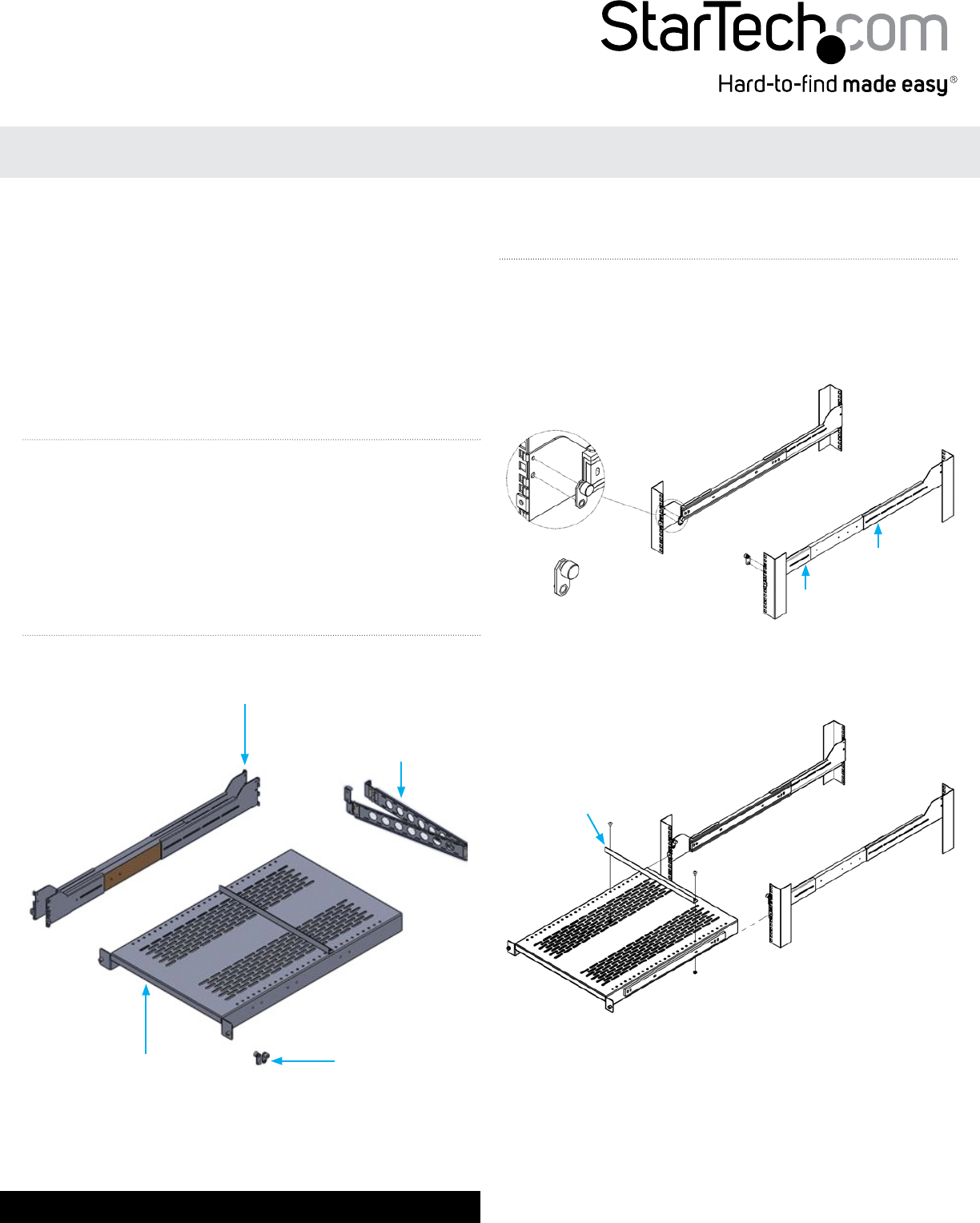
1 x Shelf Assembly
2 x Ear Hook and Slide Assembly (Left / Right)
2 x Ear Hook Bracket (Left / Right)
1 x Cable Management Assembly
1 x Instruction Manual
Installation
1. Loosen the screws along the Ear Hook and Slide Assembly and
adjust the rail to the depth of your rack.
2. Install the Ear Hook and Slide Assembly into your rack, tightening
the screws loosened in the previous step, and fasten to the front
of the rack with the Ear Hook Bracket (one per side).
UNISLDSHF19x
2U Vented Adjustable Sliding Rack Shelf with Cable Management
3. Slide the shelf assembly onto the rails.
Note: The bezel position can be adjusted on the shelf as shown in
the diagram
Attach the Cable Management Assembly to the back of the rack as
shown.
Ear Hook and Slide
Assembly (Left/Right)
Cable Management
Assembly
Shelf Assembly Ear Hook Bracket
(Left/Right)
Product Overview
Bezel
Adjustment
Page view 0
1 2

Summary of Contents

Page 1 - Product Overview

Instruction ManualDE: Bedienungsanleitung - de.startech.comFR: Guide de l'utilisateur - fr.startech.comES: Guía del usuario - es.startech.comI T:

Page 2 - Specications

FCC Compliance StatementThis equipment has been tested and found to comply with the limits for a Class B digital device, pursuant to part 15 of the FC

Comments to this Manuals

No comments