Startechcom 35BAYUSB3S4 User Manual

Browse online or download User Manual for Computer Accessories Startechcom 35BAYUSB3S4. StarTech.com 35BAYUSB3S4 User Manual [en] [de]

  • Download
  • Add to my manuals
  • Print
  • Page
    / 2
  • Table of contents
  • BOOKMARKS
  • Rated. / 5. Based on customer reviews
Page view 0
Instruction Manual
DE: Bedienungsanleitung - de.startech.com
FR: Guide de l'utilisateur - fr.startech.com
ES: Guía del usuario - es.startech.com
IT: Guida per l'uso - it.startech.com
NL: Gebruiksaanwijzing - nl.startech.com
PT: Guia do usuário - pt.startech.com
Manual Revision: 09/29/2011
For the most up-to-date information, please visit: www.startech.com
Packaging Contents
• 1x3.5”FrontPanelUSB3.0Hub
• 1xUSB3.0Cable
• 1xMountingScrewKit
• 1xInstructionManual
System Requirements
• Available3.5”frontbayopeningoncomputercase
• Available15-pinSATApowerconnectoronpowersupply
• AvailableinternalorexternalUSB3.0typeAport
35BAYUSB3S4
4 Port USB 3.0 Panel Hub for 3.5” Front Bay - Black
Installation
WARNING! Computer parts can be severely damaged by static
electricity. Be sure that you are properly grounded before opening
your computer case. StarTech.com recommends that you wear
an anti-static strap when installing any computer component. If
an anti-static strap is unavailable, discharge yourself of any static
electricity build-up by touching a large grounded metal surface
(such as the computer case) for several seconds.
1. Turnyourcomputeroandanyperipheralsconnectedtothe
computer(i.e.Printers,externalharddrives,etc.).Unplugthe
powercablefromtherearofthepowersupplyonthebackofthe
computeranddisconnectallperipheraldevices.
2. Removethecoverfromthecomputercase.Seedocumentation
foryourcomputersystemfordetails.
3. Removethecoverplateona3.5”frontbayopening.See
documentationforyourcomputersystemfordetails.
4. Slidethe35BAYUSB3S4panelintothe3.5”bayandsecuretothe
computercase.
5. ConnectaSATApowerconnectorfromthecomputerpower
supplytothe35BAYUSB3S4.
6. ConnecttheUSB3.0cablefromthe35BAYUSB3S4toanavailable
USB3.0connector.Ifnointernalportsareavailable,youmay
needtoroutethecableoutsidethecaseanduseanexternalport.
7. Placethecoverbackontothecomputercase.
8. Insertthepowercableintothesocketonthepowersupplyand
reconnectallotherconnectorsremovedinStep1.
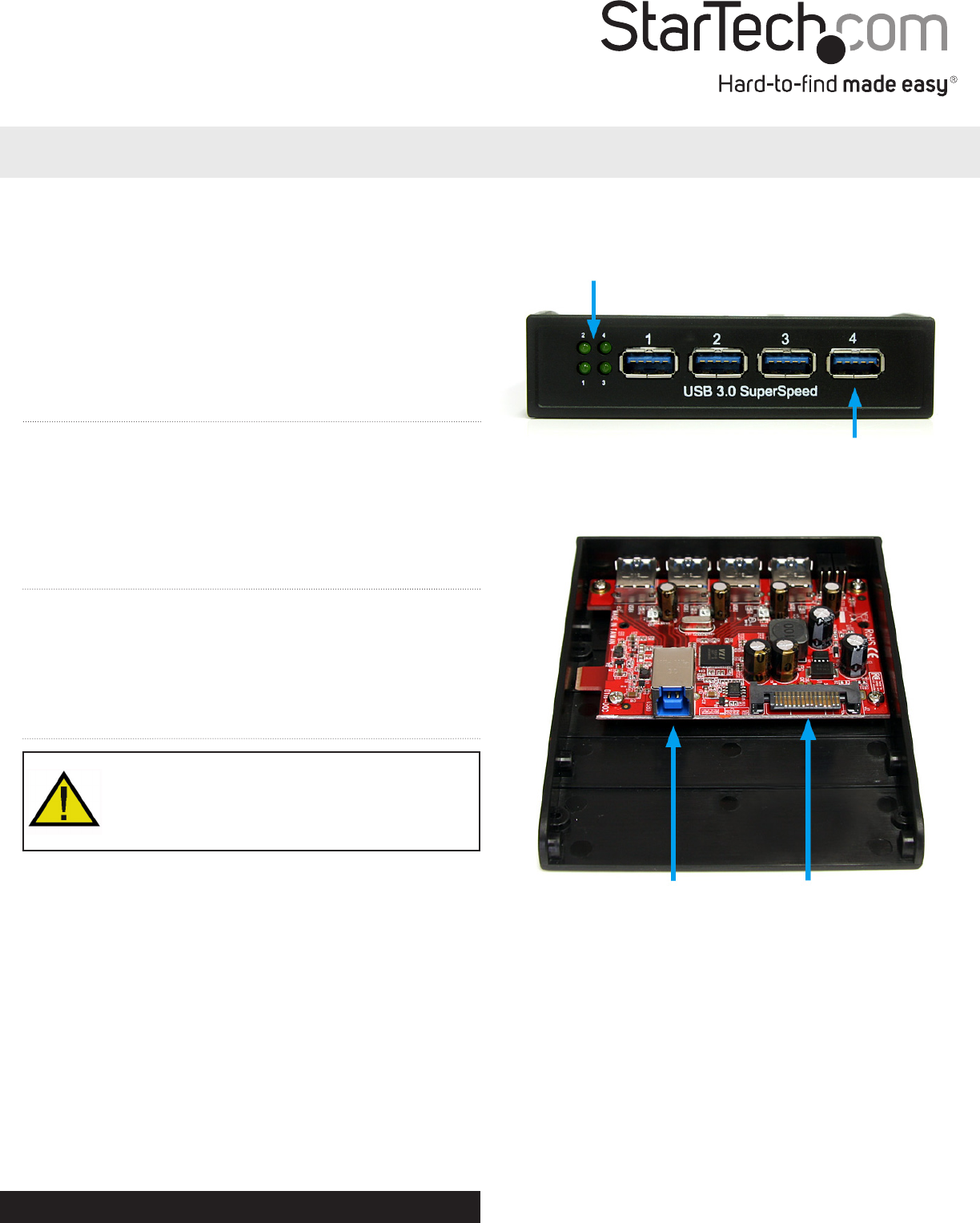
SATA Power
connector
USB 3.0 type B
connector (host)
*actual product may vary from photos
Port Link LEDs
USB 3.0 type A connector
Front View
Rear View
Page view 0
1 2

Summary of Contents

Page 1 - Installation

Instruction ManualDE: Bedienungsanleitung - de.startech.comFR: Guide de l'utilisateur - fr.startech.comES: Guía del usuario - es.startech.comIT:

Page 2 - Specications

FCC Compliance StatementThisequipmenthasbeentestedandfoundtocomplywiththelimitsforaClassBdigitaldevice,pursuanttopart15oftheFC

Comments to this Manuals

No comments