Startechcom 4POSTRACK25 User Manual

Browse online or download User Manual for Computer Accessories Startechcom 4POSTRACK25. StarTech.com 4POSTRACK25 User Manual [en] [de]

  • Download
  • Add to my manuals
  • Print
  • Page
    / 2
  • Table of contents
  • BOOKMARKS
  • Rated. / 5. Based on customer reviews
Page view 0
Instruction Manual
DE: Bedienungsanleitung - de.startech.com
FR: Guide de l'utilisateur - fr.startech.com
ES: Guía del usuario - es.startech.com
IT: Guida per l'uso - it.startech.com
NL: Gebruiksaanwijzing - nl.startech.com
PT: Guia do usuário - pt.startech.com
Manual Revision: 05/24/2012
For the most up-to-date information, please visit: www.startech.com
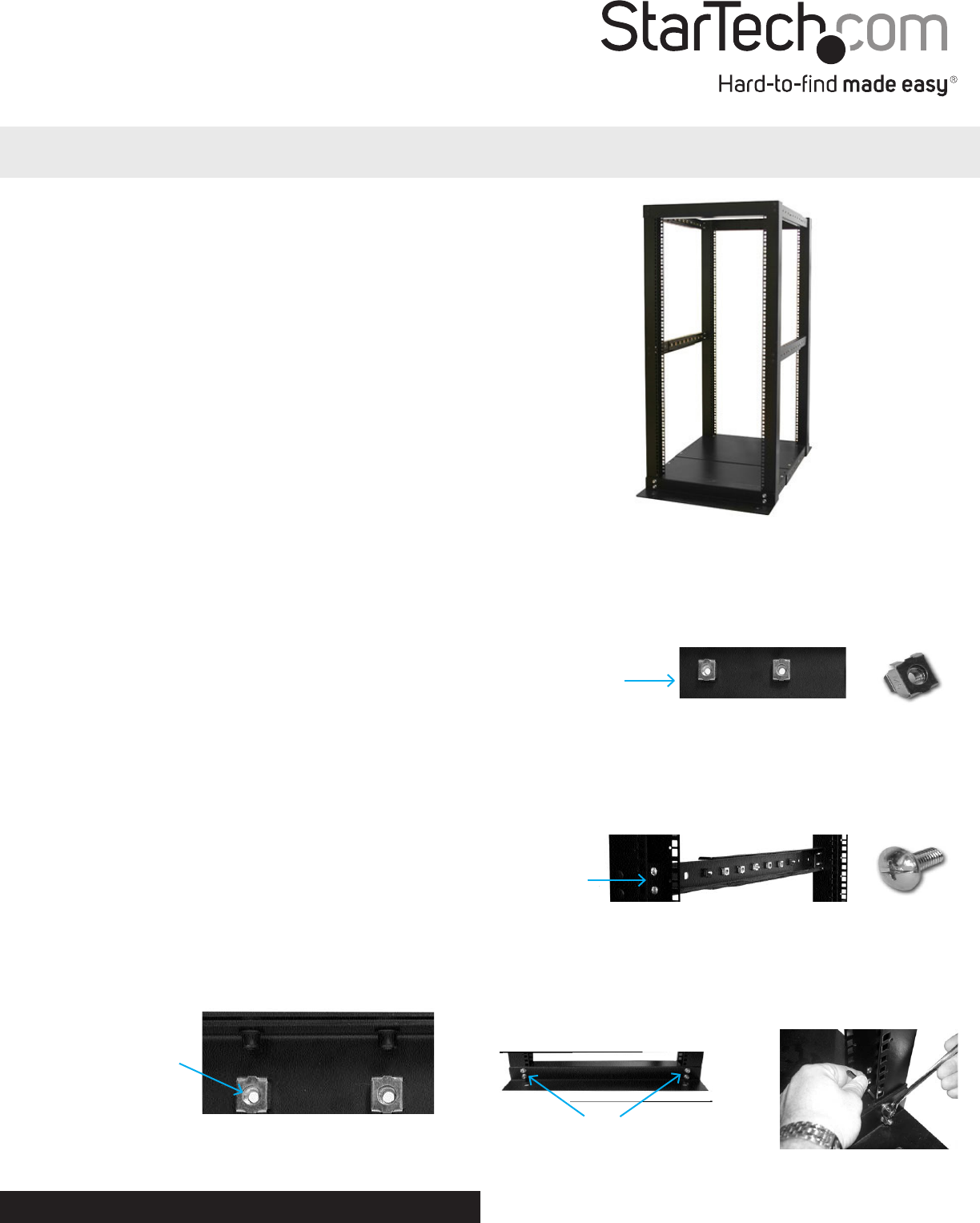
4POSTRACK25
25U 4 Post Server Open Frame Rack Cabinet
Packaging Contents
• 2xFront/RearFrame
• 2xFloorPlates
• 6xAdjustableHorizontalArm
• 2xFloorMountingBrackets
• 1xM8Hex(Allen)key
• 8xM8x25HexSocketScrews
• 42xM5x15TrussHeadScrews
• 16xBushingCaps
• 24xCabinetScrews
• 24xCageNuts
Tools Required
• 1xPhillips(crosshead)Screwdriver
Installation
1. Makesurethatthefrontandrearframesarerightsideup.The
bottomoftheframehasholesfortheoormountingbrackets
andcasters.Makesurethatthepicturedendisatthebottom.
2. Attachthearmstotheframes.Separateyourarmsintopairs
(consistingofonewideandonenarrowarmperpair).Youwill
havefourpairsofarms,twoforeachsideoftherack.Thenarrow
armsthatconnectthebottomoftheframescanbeidentiedby
thepre-mountedcagenutsontheinsideofthearms.
NOTE: Wheninstallingthearms,itmightbeeasiesttostartwiththe
toparmsforstabilityreasons.
Pre-installedcage
nuts
3. Forthetoparms,snapthecagenutsintotheback(inside)ofthe
narrowarms.Itisrecommendedthatyouinstallseveralcagenuts
oneacharm.Thecagenutsareeasiertoinstallwhentherackis
notfullyassembled.Youshouldinstallmorecagenutsthanmaybe
necessaryincaseyouchangethedepthoftherackinthefuture.
Insideofanarrow
armwithcagenuts
installed
4. Determinethedesireddepthofyourrack.Usingtwoscrews,
attachoneofthearmstotheholesontheinsideoftheframe.
Attachtheotherarmtotheothersideoftheframe,makingsure
thatthewiderarmisontheoutsideofthenarrowarm.Securethe
twoarmstogetherusingtheprovidedscrews.
Connectthe
armstothe
frameshere
NOTE:Forstability,StarTech.comrecommendsthatyouhaveuseat
leasttwoscrewstosecuretherackarms.
5. Attachtheoormountingbrackets(theL-shapedbrackets)tothe
bottomoftheframes.Usingtheincludedhexkey,installthehex
socketscrews.Install4screwsperbracket.
HexSocketScrews
*actual product may vary from photos
WARNING!Topreventbodilyinjury,pleaseensurethattherack
isinstalledinastructurallysoundenvironmentwithaleveloor
andthatallhardwarehasbeenassembledsecurely,andcheckedfor
stabilitybeforeloadingequipment.Wheninstallingequipmentinto
therack,startfromthebottomoftherackrstandmoveupwards,
keepingtheheaviestequipmentatthebottomtoavoidasituation
wheretherackbecomestop-heavy.
Page view 0
1 2

Summary of Contents

Page 1 - Instruction Manual

Instruction ManualDE: Bedienungsanleitung - de.startech.comFR: Guide de l'utilisateur - fr.startech.comES: Guía del usuario - es.startech.comIT:

Page 2 - Specications

Use of Trademarks, Registered Trademarks, and other Protected Names and SymbolsThis manual may make reference to trademarks, registered tradem

Comments to this Manuals

No comments